Ticket comes into HubSpot Customer Service Queue as "New ticket created from form submission"
Step 1:
Open ticket
Step 2:
On the Activity tab, click on VIEW DETAILS

Step 3:
Click on the 3rd or 4th page at the bottom of the screen to take you to the webform details

Step 4:
Click on the Website Connect to Form

Step 5:
Copy the Contact Record

First Name
Luan
Last Name
Martins
luanm6480@gmail.com
Step 6:
Open up a Note in the ticket and copy the Contact Record into a Note
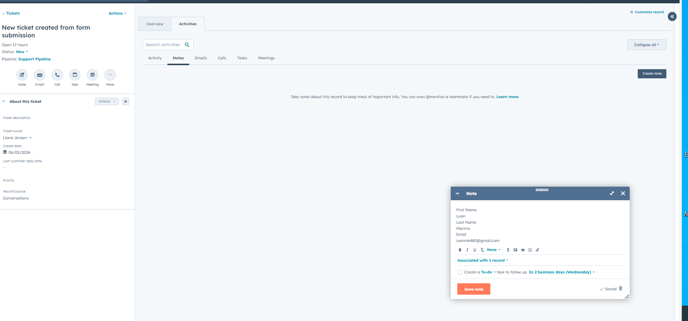
SAVE
Step 7:
Open up the Ticket name and change the Ticket name to "Reason For Request" (make sure each letter of the words are capitalized)

SAVE
Now handle the ticket how you would any other email request that was received in HubSpot
If you have not had any response to a Webform Request Follow up after 3 days, it is ok to CLOSE the ticket and use the Resolution "no response from member".